
MIGRATION FAQ
Frequently Asked Questions
Everything Horizon customers most often ask before making the move. Don't see your question? Your dedicated onboarding specialist is one call away.
Why is Carson Dunlop retiring Horizon?
The inspection software market has evolved significantly over the past decade, particularly with the rapid advancement of mobile technology, automation, integrations, customer experience expectations, and, more recently, AI-powered tools.
While Horizon has served our customers well, the pace of innovation in inspection software continues to accelerate. Remaining at the forefront increasingly requires significant and ongoing investment, dedicated technology expertise, and a singular focus on software development.
As we evaluated the long-term future of the platform, we concluded that our resources would generate greater value if focused on the areas where Carson Dunlop has a distinct competitive advantage: education, inspector training, industry expertise, franchise development, and customer support, rather than proprietary software development.
In short, this was a decision based on where Carson Dunlop can create the greatest value for inspectors and the profession over the long term.
What are my options?
We have developed export tools to ensure you can access and retain your information throughout the transition period. You may choose to move to another reporting platform or export your data for your own records before Horizon is retired.
After an extensive evaluation of the inspection software market, Carson Dunlop is recommending that current Horizon users consider migrating to Spectora platform. We believe Spectora offers the strongest combination of technology, innovation, customer support, and long-term commitment to the inspection industry. Our migration tools, training resources, webinars, onboarding materials, and transition support have been designed to help Horizon users move to Spectora as smoothly as possible.
Why is Carson Dunlop recommending Spectora?
After evaluating multiple reporting platforms and long-term technology options to recommend to Horizon users as we retire Horizon, we determined that Spectora offered the strongest combination of innovation, usability, support, and future investment.
Spectora offers many features and benefits, including:
-
Modern mobile-first reporting
-
AI-powered productivity tools
-
Ongoing product development
-
Strong customer support infrastructure
-
Extensive integration ecosystem
-
Proven adoption across the inspection industry
-
Unparalleled support to Horizon users during migration
In addition to cutting-edge features and a commitment to ongoing research and development of the platform, Spectora is offering dedicated 1:1 onboarding at no cost to all Horizon users to transition to their platform, providing you with a seamless transition experience.
Carson Dunlop is making a significant investment to secure additional support and resources to support Horizon customers through this transition. To help offset a portion of these costs, Spectora is providing Carson Dunlop with a one-time administrative fee. There is no long-term commercial relationship related to this recommendation.
Why recommend migration to Spectora over building a new Horizon platform?
As part of our long-term planning, we explored the possibility of developing a next-generation version of Horizon.
That evaluation included assessing the pace of change in inspection technology, the investment required to remain competitive, and most importantly, where Carson Dunlop could create the greatest long-term value for inspectors and the profession.
As the review progressed, we concluded that our resources would generate greater value if focused on the areas where Carson Dunlop has long been differentiated: education, industry expertise, franchise development, and support for inspectors, rather than continued proprietary software development.
At the same time, the inspection software market has continued to evolve rapidly. Rather than spending several years developing a new platform internally, we believe inspectors are better served by access to technology that is already benefiting from significant ongoing investment and innovation.
What is the timeline for the transition?
Horizon will remain fully operational until December 15, 2026.
We encourage inspectors to begin evaluating their options and planning their migration as soon as July 28th. Starting early provides more time to become familiar with your new platform, migrate historical data, and take advantage of the transition resources available to you.
You will not lose immediate access to Horizon. The transition period is designed to give inspectors flexibility while avoiding the challenges that can come with leaving a migration until the final weeks before sunset.
Inspectors may choose to migrate to Spectora, evaluate another reporting platform, or export their data for their own records. Regardless of the path selected, Carson Dunlop will provide support and resources throughout the transition.
Our goal is to make the transition as smooth and predictable as possible, with minimal disruption to your business.
What happens to my reports, data, and history? Do I need to export it?
All users, including real estate partners and customers, will have access to the data until Horizon sunsets on December 15, 2026. After this date, the data will no longer be accessible.
We strongly recommend exporting and retaining any records you may need for regulatory, insurance, legal, or business purposes. You should begin this process as soon as possible to ensure a smooth transition.
Requirements vary by jurisdiction, so inspectors should follow the record retention requirements applicable to their province, state, licensing body, insurer, or association.
After Horizon sunsets on December 15, 2026, Carson Dunlop will manage the data in accordance with applicable legal requirements and securely delete this information.
Will my comment library carry over to Spectora?
Yes. Preserving your work and your inspection process is one of our highest priorities during this transition.
Carson Dunlop and Spectora have worked together to develop a migration tool that transfers your comment library, including the systems, categories, tasks, observations, defects, recommendations, limitations, and other content used to create your inspection reports.
While every effort has been made to ensure a complete and accurate migration, Spectora recommends reviewing your templates and settings after migration to confirm they meet your individual preferences and business requirements.
What transfers to Spectora?
Spectora and Carson Dunlop have worked together to create a migration process that minimizes manual effort and helps preserve as much of your existing setup as possible.
Information That Transfers:
-
Company information
-
User account and team member information
-
Agent and brokerage information
-
Client information
-
Configuration settings
-
Your comment library, including the systems, categories, tasks, observations, defects, recommendations, limitations, and other content used to create your inspection reports
-
Other information reasonably required to configure your Spectora environment
Information That Does Not Transfer:
-
Historical inspection reports
-
Historical work order data
-
Report PDF files
-
Inspection photos and attachments
-
Third-party integrations and connected services
-
Payment connections
-
Existing bookings and scheduled jobs
-
Login credentials (username/passwords)
What is the migration process to Spectora?
The Spectora migration process has been designed to be as simple and automated as possible. Starting early gives you the most flexibility and the smoothest transition experience.
The process is straightforward:
-
Review the migration resources and follow these steps.
-
Initiate the migration process from Horizon starting July 28th.
-
Provide consent for the transfer of your data.
-
Receive a unique Spectora registration link.
-
Use this link to sign in to or create your Spectora account.
-
Allow the migration to complete in the background. You can begin exploring and configuring Spectora while the migration is underway.
-
Spectora will notify you when the migration is complete.
-
Review your comment library and migrated data.
-
Complete a test inspection.
-
Continue using Horizon during the transition period if desired.
-
Complete your migration before the Horizon sunset date, December 15, 2026.
-
Complete the download of your data from Horizon, as it will no longer be available after December 15, 2026.
How long does migration take?
Migration times vary depending on the amount of data being transferred. Most users can begin exploring, configuring, and learning Spectora immediately while migration continues in the background. Spectora will notify you via an in-app banner once the migration is complete.
What if I need help?
Dedicated migration support teams from both Spectora and Carson Dunlop are available throughout the process by emailing support@spectora.com or horizon.support@carsondunlop.com.
Additional documentation, migration guides, training materials, and support channels will be provided to help ensure a smooth transition.
If I have multiple Horizon accounts, will I have multiple accounts in Spectora?
Yes. Each Horizon account migrates to its own Spectora account, one for one. Once you are settled in and know the system, you can reach out to us if you want to combine them. Just keep in mind that combining is not always the right move if your accounts have different business names or tax entities. We can help you think through what makes sense for your situation.
I need unique email addresses for each Spectora account. What do I do if I used the same email in Horizon?
Spectora uses your email address as your unique login, so you cannot create two accounts with the same email. If you have two Horizon accounts under the same email and want to migrate both, here is what to do: migrate your first account as normal, then for the second account, use your email address with +1 added before the @. For example, if your email is mike@bestinspections.com, use mike+1@bestinspections.com for the second account. Once both accounts are migrated, contact our support team, and we will remove the +1 so your email is clean.
Is my data secure during migration?
Yes. Data is transferred through a secure migration process developed jointly by Carson Dunlop and Spectora and is transmitted using industry-standard security measures designed to protect customer information during transfer.
Your data remains your property throughout the process and is transferred solely for the purpose of completing your migration to Spectora.
Protecting inspector, client, and agent information remains a priority throughout the migration process.
The migration process only occurs after you provide consent and initiate the transfer from Horizon.
What are the benefits of using Spectora?
Every home inspection software has its own look and feel. What stood out to us about Spectora is the experience it creates for you, your clients, and agents.
Benefits include:
-
Interactive reports, easy to view on mobile and desktop devices or as a PDF if preferred
-
Smoother bookings 24/7 with a built-in scheduler, so all you do is confirm the appointment
-
Less admin work with automated communications that keep clients and agents informed
-
Easy repair requests for clients and agents through their report viewing portal
-
Ongoing product development, bug fixes, and support for your questions and business needs
Spectora brings modern report writing, scheduling, and client communication into one place, so you deliver a great experience at every step, from booking to final report. Once set up, inspectors consistently report saving 1–2 hours per inspection, giving you more time to build your business or just get home in time for dinner.
What will Spectora cost?
Horizon customers can get 50% off Spectora, free onboarding, and one-click migration.*
Horizon has partnered with Spectora to make your transition as easy as possible. You will get dedicated 1:1 onboarding at no cost, one-click data migration built right into Horizon, and access to Spectora University video courses. Your comment library, contacts, and more come with you. Choose the plan that works for you.
50% Off Spectora:
-
Monthly: $55/month for your first 6 months (reg. $109/month). Standard pricing after. Save $324.
-
Annual: $545 for your first year (reg. $1,090/year). Standard pricing after. Save $545.
Have multiple inspectors on your team?
After initiating your migration, your team will receive an invite to join your Company on Spectora. Once the invite is accepted, reach out to Spectora’s support team at support@spectora.com, to have the 50% discount applied to their add-on inspector account(s) as well.
Sign up by January 31, 2027 to claim the discount. After your intro period, standard pricing applies.*
Included for Every Horizon Migrator (No Extra Cost):
-
One-on-one Express Onboarding with a dedicated Spectora team member ($299 value)
-
One-click migration of comment library, contacts, and more
-
Access to Spectora University online training resources
-
Live migration webinar and open office hours for support
In addition, Spectora has dedicated onboarding specialists, migration experts, and customer support representatives available to assist with setup, migration, training, and ongoing platform questions.
*Offer valid through January 31, 2027, for Horizon customers only. Promotional pricing applies to the first 6 months or the first year, depending on the plan selected. Standard pricing applies after. Offer subject to change. Cannot be combined with other promotions.
What support is available during the migration?
Carson Dunlop and Spectora are investing significant resources to support Horizon users throughout the transition.
Carson Dunlop will continue supporting Horizon-related billing questions, renewal accommodations, franchise inquiries, and transition-related concerns.
Spectora will be your point of contact for onboarding and questions about using the platform.
Every Horizon customer who migrates to Spectora will receive migration support at no additional cost, including:
-
One-on-one Express Onboarding with a dedicated Spectora team member ($299 value for free)
-
One-click migration of comment library, contacts, and more
-
Training resources, including live migration webinar, office hours, Spectora University courses, and support guides
What is Express Onboarding?
Express Onboarding includes one live, 1-on-1 guided setup session with a Spectora onboarding specialist. It's free for all Horizon users transitioning through this migration. During these sessions, a Spectora onboarding specialist will walk through your dashboard and answer any questions to make sure you're ready to inspect with Spectora.
Please note: Capacity for live Express sessions is limited. We recommend booking early, especially for multi-inspector firms, to get set up before the deadline.
Is there self-serve training if I can't do a live onboarding session?
Yes. Spectora University offers free on-demand video courses for all subscribers, including a dedicated Getting Started Series for new users. Topics include account setup, templates, report writing on the app and the web, scheduling, and payments.
I recently renewed Horizon. What are my options?
If you have unused subscription credits or unused months remaining, you're eligible for a refund, prorated to full months unused (no refund for partial or remaining days). Alternatively, you can convert your annual subscription to a monthly one and request a refund on the annual fee based on the months you didn't use.
How to submit a refund request?
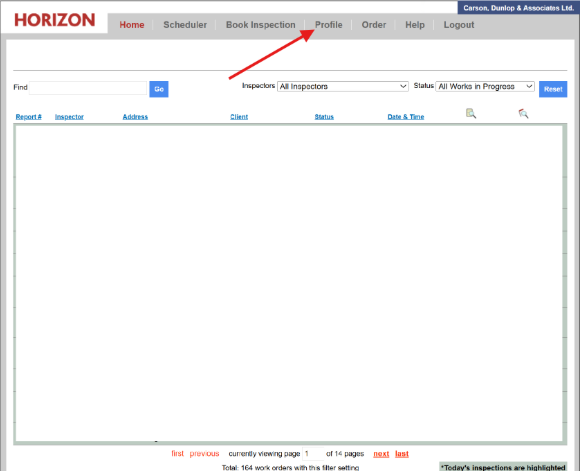
Step 1: Click on the “Profile” link on the top menu bar
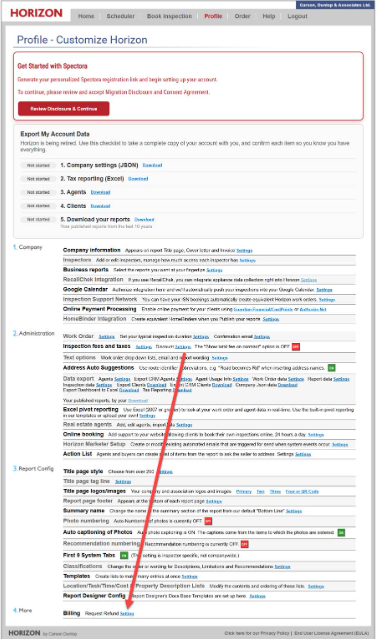
Step 2: Scroll down to the bottom of the page and click on “Settings” next to Refund Request
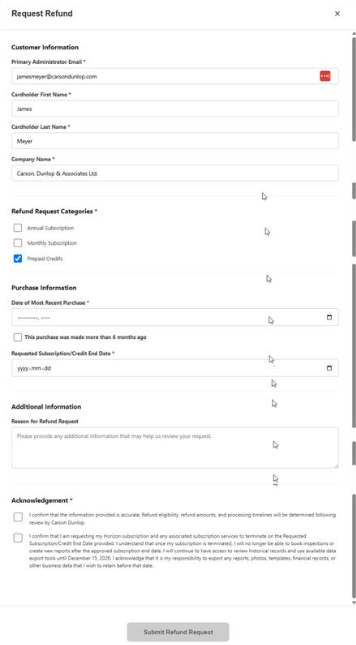
Step 3: Fill out the Refund Request form, review and acknowledge the terms and conditions, and click Submit Refund Request.
Once you have clicked submit, you will receive a confirmation email confirming your refund submission. Please note it may take up to 20 business days for the refund to be calculated and processed.
I already switched from Horizon to Spectora recently. Can I get this discount?
If you switched earlier in the year, please contact Spectora's Support team at support@spectora.com, and they will review the options available for your specific situation.
How do I export my data from Horizon?
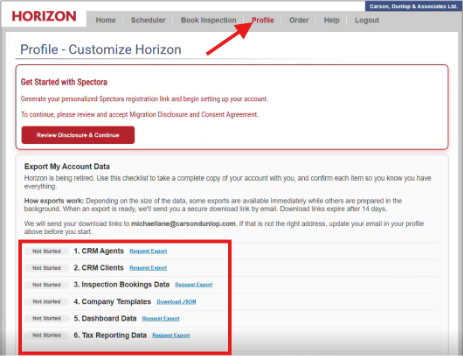
Horizon includes built-in export tools for a wide range of business, customer, reporting, and inspection information. Export options are available from the Horizon Profile page under the “Profile” section of your account.
Available exports include:
-
CRM Agents (Agent List)
-
CRM Clients (Client List)
-
Inspection Bookings Data (Work Order Data)
-
Company Templates (Report templates and configuration settings)
-
Dashboard Data (Business at a glance dashboard data)
-
Tax Reporting Data (Historical tax reporting data)
How do I request an export?
Navigate to the Export Centre under the “Profile” section and select the export you want. Horizon will prepare the export in the background
Will my export download immediately?
Not always. Smaller exports may be available immediately, while larger exports may take time to prepare
How will I know when my export is ready?
You will receive an email notification containing a secure download link once the export has been prepared.
How long is the download link valid?
Download links expire after 14 days. If your link expires, you can return to Horizon and request a new one.
Who receives the download link?
Download links are sent to the primary administrator email address associated with your account.
Can I continue using Horizon while exports are being prepared?
Yes. Export preparation occurs in the background and does not require you to remain on the export page. You will be notified by email when your export is ready.
If you require assistance, our support team will be available to help you successfully retrieve your data. However, customers remain responsible for ensuring that any records they wish to retain are exported prior to the retirement of the Horizon platform.
I still have questions. How can I get help?
Members of both the Carson Dunlop and Spectora teams will be available throughout the transition to answer questions, provide guidance, and help ensure a successful migration.
You can:
-
Call the Horizon support line
-
Book a migration call with the Spectora team
What does a Spectora report look like? Is it a PDF like Horizon?
You've got two options, and you can use whichever fits each client. Spectora delivers an interactive web-based report through a link in an email or text, or a PDF the same way. Both are mobile-friendly with high-resolution photos. The web report adds filtering by defect severity, embedded videos, a summary view, and built-in agent tools like the Repair Request Builder, so the people reading it can actually act on it.
I had a lot of pre-written content in Horizon. Will I lose it?
No. Your comment library, including the systems, categories, tasks, observations, defects, recommendations, limitations, and other content used to create your inspection reports. If you want to clean things up afterward, AI Comment Assist helps you rewrite and refine your language fast. You'll also find the Spectora Template Center is free and stocked with dozens of templates shared by top inspection companies, ready to use on day one. We even have a Canadian CAHPI SOP Template, designed with CAHPI standards of practice in mind.
Does Spectora have a completion checklist so I don't miss items?
Yes. Spectora's templates are built on a section and item structure, so you can see your progress as you go. The mobile app shows checkmarks as you finish sections, and a section turns green once all its comments are done. You get the same confidence you're used to that nothing slipped through.
Can I still write my reports at my desk after the inspection?
Yes, however you like to work. Write fully on-site in the mobile app, finish at your desk in the web editor, or do a mix of both. The mobile app works offline and syncs once you reconnect, so a weak cell signal in a basement or rural property never holds you up.
How does scheduling work compared to Horizon?
It'll feel familiar. Like Horizon, Spectora uses single-entry booking, so inspection details flow automatically into your report, contract, invoice, and emails. What's new is a public scheduling widget you can put on your website, so clients and agents can book you 24/7 without calling or emailing. You still keep full control of your calendar and availability.
What about Horizon Marketer? Does Spectora have automated marketing?
Spectora includes automated email and text notifications tied to every inspection, like confirmations, follow-ups, and review requests, so your routine client communication runs on its own. If you leaned heavily on Horizon Marketer for broader outreach, reach out to our team, and we'll walk you through what's available.
Does Spectora support ancillary forms like pool, radon, or WDI reports?
Yes. Industry forms, including WDI, radon, NPMA-33, 4-point, wind mitigation, and more, can be added from the Spectora Template Center for free.
What is the Repair Request Builder?
It lets agents and buyers build a custom repair request list straight from your published report, asking for credits, repairs, or replacements. It saves agents real time during negotiation, and it's one of the most common reasons agents recommend Spectora inspectors to their clients. Clients can see their repair requests right in their portal.
Still have questions?
Book a call with your dedicated migration specialist.
No commitment — just answers.