
Ask your business a question. Or build something new.
Connect Claude or ChatGPT to your Spectora account and ask about your business in plain language. Or wire Spectora into the tools you already run, like your CRM or a spreadsheet, with a documented API.
Included with every subscription
TWO WAYS TO CONNECT
One is for asking. One is for building.
Ask a question, or build a connection. The AI Connector (MCP) turns an AI assistant into something you can just talk to about your business. The API is how Spectora plugs into the other tools you run, like your CRM.
NO CODING REQUIRED
AI Connector (MCP)
Connect Claude, ChatGPT, or any compatible AI tool to your Spectora account, then ask about your business in plain language, the way you'd ask an office manager. No coding required.
-
Works with Claude Desktop, Claude Code, ChatGPT, and Cursor
-
One-time connection, then plain-language questions
-
14 ready-made workflows built by our team
-
Read-only, so it can't book, edit, or delete anything
BUILD YOUR OWN CONNECTIONS
API
A documented API that connects Spectora to your CRM, your reports, or whatever else runs your business. When something changes, like a new inspection or an updated client, it pushes the update automatically, so nothing needs to be manually refreshed.
-
Webhooks for real-time events
-
API key
WORKFLOW LIBRARY FOR YOUR AI CONNECTOR (MCP)
Fourteen workflows. Already built. Free to use or build your own.
You don't have to figure out what to ask. Download a workflow, drop it into Claude or ChatGPT, and say "run the Weekly Ops Readiness Brief." Every one is plain text, so you can change the date ranges or add your own rules on top.
DAILY & WEEKLY OPS
Weekly Ops Readiness Brief
Pulls the next 7–14 days and flags what's at risk: unconfirmed appointments, unsigned agreements, unpaid jobs, and missing contact info. Then it hands you a prioritized checklist with the phone numbers attached.
DAILY & WEEKLY OPS
Daily Inspector Prep Brief
A personalized brief for each inspector the evening before: lays out every job in order, with property details, client and agent contacts, and an equipment checklist built from that day's service mix.
AGENT RELATIONSHIPS
Lapsed Agent Reactivation
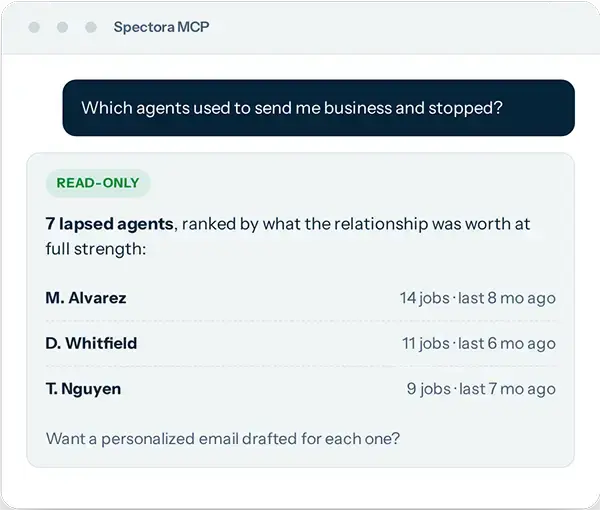
Finds the agents who used to send you business and stopped, ranked by what the relationship was worth, with an email and call script drafted for each top target.
AGENT RELATIONSHIPS
Agent Portfolio Scorecard
Your whole book of agent relationships at a glance: who your VIPs are, who's rising or fading, how concentrated your revenue is, and who deserves a touchpoint this month.
REVENUE & GROWTH
Revenue Pace & Forecast Tracker
Answers "how is this month actually going, and where will we land?" It combines month-to-date revenue, forward pipeline, and booking pace into a floor, base, and stretch forecast.
REVENUE & GROWTH
Add-On Attach Rate Optimizer
Measures how often radon, sewer scope, termite, thermal, pool, and water testing attach to your core inspections, broken out by inspector, agent, and area, and frames the gap in dollars.
REVENUE & GROWTH
Cancellation Forensics & Recapture
Quantifies lost revenue from cancellations, finds the patterns, and builds a recapture list of recently canceled clients whose need probably survived, with a check-in drafted for each.
REVENUE & GROWTH
Past-Client Annual Check-Up Mining
Finds clients whose inspection was about a year ago and drafts warm outreach referencing their actual home and inspection date. A monthly stream of re-engagement at almost no cost.
REVENUE & GROWTH
Marketing Attribution Report
Shows which referral sources and discount codes actually produce bookings and revenue, and scores how much of your business is untracked before you move a marketing dollar.
INSPECTOR PERFORMANCE
Inspector Utilization Scorecard
Compares inspectors fairly on volume, revenue, average ticket, attach rate, and calendar density while controlling for job mix. Framed as coaching, not a leaderboard.
INSPECTOR PERFORMANCE
Service Area & ZIP Analysis
Shows where your business actually comes from on the map, how concentrated your territory is, and which nearby ZIPs have little or no current volume.
MULTI-LOCATION
Multi-Location Performance Rollup
Your whole multi-location business in one view: revenue, volume, and pipeline across every location, benchmarked on rates so the comparison is fair regardless of size.
MULTI-LOCATION
Cross-Instance Agent Network
Reveals agent relationships no single account can see: who works with more than one of your locations, what they're worth company-wide, and who lapsed at one office but is active at another.
MULTI-LOCATION
Cross-Business-Line Cross-Sell Miner
For companies running inspections, pest, commercial, or handyman on separate accounts. Finds customers of one line who've never used another, with outreach ready to send.
CUSTOMER STORY
What inspectors are actually building with it
"Been using Spectora since day one... it helped our business in so many different ways, from the presentation of the product itself to the delivery of the inspection report."
Fred Rodrigues
Damn Good Inspection
PARTNER INTEGRATIONS
Already connected to the tools you run on
Accounting, calendars, call centers, marketing, home warranties. The connections inspectors ask for most are built in and ready to turn on from your settings.
Accounting & payments Money in, books balanced
QuickBooks Online
Inspections, invoices, and payments sync automatically. Choose whether ACH syncs on initiation or after it settles.
Built-in payments
Card, Apple Pay, Google Pay, and ACH tied to each inspection. Reports stay locked until you're paid.
Zapier
Push new and updated contacts to thousands of apps like Sheets, Slack, and your CRM, with no code. This feature is for Advanced users.
Webhooks
Real-time events sent to your own endpoint the moment something changes in your account. This feature is for Advanced users.
Calendars One schedule, everywhere you look
Google Calendar
Two-way sync. Spectora events show up in Google, and your Google events show up in Spectora.
Calendar Feed (iCal)
Subscribe to your Spectora calendar from Apple Calendar, Outlook, or any app that reads an iCal feed.
Client value & add-ons More for the buyer, more for you
HomeBinder
Give every client a digital home manual built from their inspection, and stay in front of them for years.
Repair Pricer
Turn a finished report into a line-item repair cost estimate agents and buyers can act on.
RecallChek
Automatic appliance recall checks attached to the inspection, delivered to your client.
InterNACHI Buy-Back
Enroll qualifying inspections in the InterNACHI Buy-Back Guarantee without leaving Spectora.
Fixle
Manage protection product settings and offer them as part of your inspection.
Testing and Lab Reports Every test, one inspection
Breeze (radon)
Book a radon test in Spectora and the appointment shows up in Breeze automatically. When the report’s ready, it lands right on the inspection.
PriorityLab (lab testing)
Air, asbestos, lead, mold, and water testing made easy. The order goes out, the report comes back, and your team saves time and manual effort.
Call centers Someone answers when you can't
America's Call Center
Answering and booking service connected directly to your calendar.
Simple Solutions
Overflow and after-hours call coverage with live scheduling.
Marketing & reputation Reviews and follow-up, handled
Mailchimp
Sync clients and agents into your audiences so campaigns go out to a list that's actually current.
Blipp Reviews
Automated review requests after the report goes out, so your rating keeps climbing.
Need something that isn't on this list? Build it on the API →
FOR SOFTWARE PROVIDERS
Partner with Spectora — Integrate Your Product
Spectora powers thousands of home inspection businesses nationwide. By integrating your product with Spectora, you can unlock a direct channel to an active, tech-forward audience looking to streamline their operations.
Ready to build together?
Fill out the form to share details about your product and explore partnership opportunities.
GETTING STARTED
Connected in about five minutes
Generate your key
Sign in as a company admin at developer.spectora.com and create an API key, or connect through OAuth from your AI tool.
Connect your AI tool
Add the Spectora MCP server to Claude, ChatGPT, or Cursor. One setup, then it stays connected.
Ask, or build
Load a ready-made workflow and run it, or start writing against the API with the docs and examples.
COMMON QUESTIONS
Questions inspectors ask about the API and AI Connector (MCP)
Not for MCP. Once it's connected, using it is as simple as downloading a workflow file and telling Claude or ChatGPT to run it, or just asking a question in plain language. The API is the option that expects a developer or an automation tool.
They pull from the same Spectora data. The API lets that data travel to other tools, where you decide what to ask for and wire it up. MCP puts an AI assistant on top of the API so it can figure out what it needs on its own. You give it a goal; it goes and gets the data. Plenty of companies use both.
Claude Desktop, Claude Code, ChatGPT (paid plan with developer mode enabled), Cursor, and any other MCP-compatible AI tool. Longer multi-step workflows tend to run most reliably in Claude.
No. Access is read-only. It can pull and analyze your data, but it cannot book, edit, or delete anything. Every workflow in the library hands you a draft or a checklist and leaves the acting to you.
No. Both the API and MCP are included with every paid Spectora subscription. Usage limits are generous enough that most inspectors will never think about them, and going over triggers a notification, never a surprise bill.
Your API key is tied to your company account and should be kept private. Never share it publicly or put it in client-facing code. If you think a key has been exposed, you can roll it immediately from the API Keys page at developer.spectora.com. Supported AI tools can also connect through OAuth instead of a shared key.
Yes. Every workflow file is plain text. Open it and change the date ranges, adjust what gets flagged, or stack your own instructions on top.
The API can create and update client and agent records, and upload attachments to inspections. It can't schedule inspections, make calendar changes, or edit reports yet, and report content isn't available to read. The MCP server is read-only for now. We're building toward more, and the developer docs stay current on what's live.
Support can help with general questions about the API and MCP. Because setup varies by device, operating system, and AI tool, deeper technical configuration is sometimes faster with an IT professional who has API experience. For a multi-inspector or enterprise build, talk to our sales team and we'll get the right person involved.
Your business already has the answers. Now you can just ask.
Start a free trial and connect your AI tool today, or talk to our team about what you want to build on the Spectora API.
Set up in minutes · No credit card required.