
SAMPLE INSPECTION REPORTS
One report you build. One shared view your clients and agents both trust.
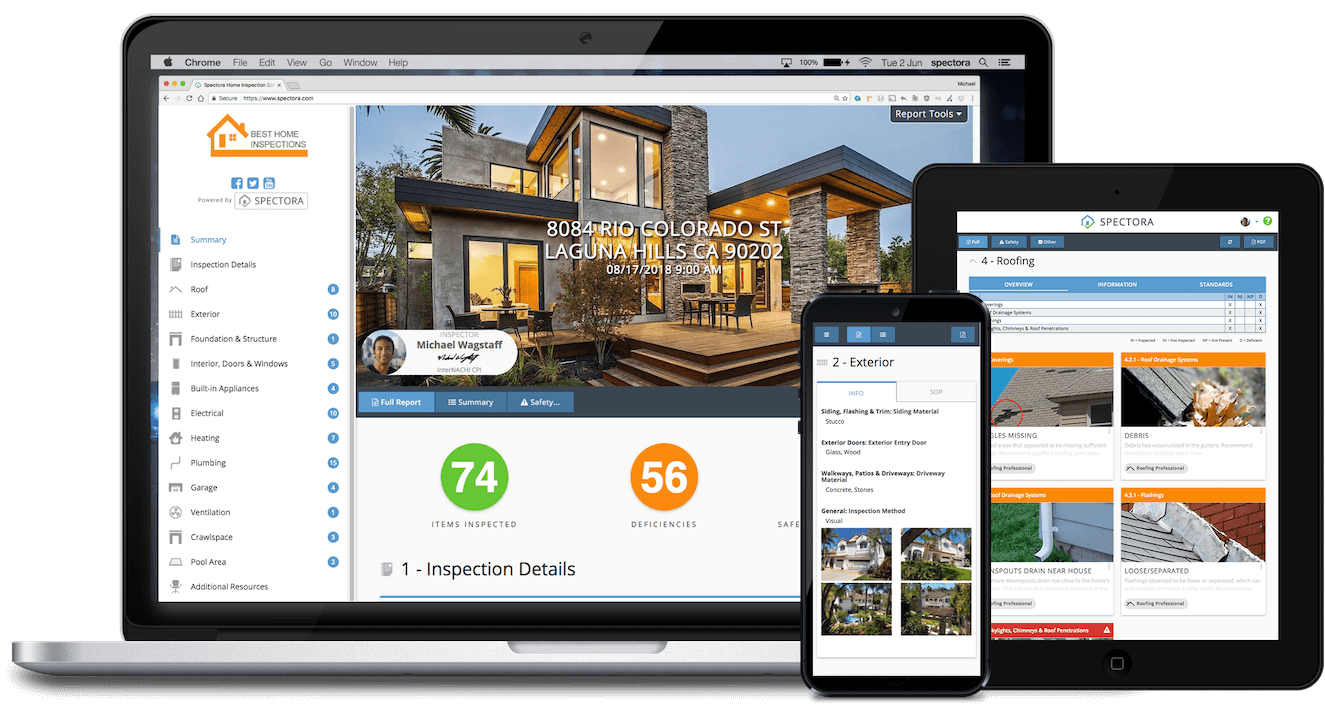
You build the report in the field. Your client and their agent open the same clean, mobile-friendly view: one to trust it, the other to negotiate with it. See how one Spectora report works for everyone, and why it makes you look like the pro you are.
12,000+
Inspectors run their business on Spectora
Web-based
Opens in any desktop or mobile browser
1 Portal
One report view, shared by clients and agents
The home inspection report you build does more than document a home. It carries your expertise into every conversation that happens after you leave.
A great report isn't just a deliverable. It's the thing your client trusts and their agent negotiates with. Here's what that looks like at each stage.
STEP 1 · WHAT YOU BUILD
Write the report your way. Spectora keeps it clear.
Whatever your inspection style, Spectora gives you the tools to build an inspection report that reflects it: photo annotations, video walkthroughs, customizable templates, and a summary that highlights what matters most, aligned to your state or association's Standards of Practice. You control the details. We make sure they land.
Photo & video annotation
Mark up photos on-site and drop in walkthrough video so nothing gets lost between the field and the final report.
Templates built for your style
Streamlined summaries, numerical ratings, TREC/state-specific formats: set it up once, reuse it every inspection.
AI Message Assist
Draft professional client and agent messages in seconds. AI Message Assist writes the email or text, you review and send.
STEP 2 · WHAT YOUR CLIENT & THEIR AGENT SEE
One report view. Trusted by homeowners, used by agents to negotiate.
Your client and their agent open the same report: a clean view that works on any desktop or mobile browser, no app required. A PDF version is available too, for anyone who wants to save or print a copy.
Browser-based, on any device
Opens instantly on desktop or mobile for client or agent. No app download, no account required, just a link. Need a PDF? That's available too.
Summary they can actually skim
Key findings surface first, so an overwhelmed buyer (or a busy agent) isn't stuck parsing 60 pages to find what matters.
One link, shared by everyone
Buyer, listing agent, and transaction team all work from the same report: negotiation-ready, with no re-sending or version confusion.
Confidence in you, not just the house
A clear, professional report is often a client's first impression of your business, and an agent's reason to call you again.
REAL REPORTS, REAL INSPECTORS
See a few report styles in action.
Every inspector's report looks a little different. Here are a few real examples, built by real Spectora inspectors.
STREAMLINED
Clean, diagram-driven summary
A streamlined report with informative diagrams and Standards of Practice built right in, easy for clients to follow from cover to cover.
PHOTO-RICH
Detailed, deficiency-focused
A photo-rich report that clearly details items in good shape alongside limitations and deficiencies, so nothing gets missed in the walkthrough.
PHOTO ANNOTATIONS
Great photo call-outs, easy to follow
A sample report showing clear photo annotations, so clients and agents can see exactly what the inspector is pointing to at a glance.
See what Leigh Gate has to say about his move to Spectora
About Spectora templates
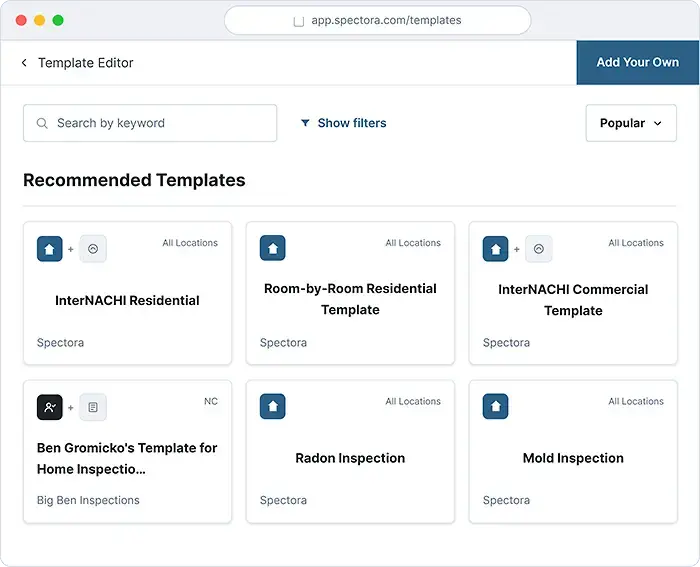
Spectora templates are built to follow the standards inspectors use including the CAHPI Standards of Practice in Canada, the TREC REI 7-6 form in Texas, and state-specific forms like wind mitigation, 4-point, and NPMA-33. Start from a template that already matches your requirements, then change anything you want. The structure stays compliant; the wording stays yours. Leigh Gate of Home Advantage Inspections moved to Spectora from Horizon and built his own CAHPI Standards of Practice template. It's now published in the Spectora Template Center for other Canadian inspectors to use.
COMMON QUESTIONS
Report questions answered
What does a Spectora home inspection report include?
A Spectora report includes photo and video annotations, a clear summary of findings, and details organized to match the inspector's Standards of Practice. Inspectors can customize templates to fit their own reporting style.
Can real estate agents view a Spectora inspection report?
Yes. Agents view the same shareable report link as the client. It opens in any desktop or mobile browser with no app or login required, and a PDF version is also available.
Do clients need to download an app to view their report?
No. Spectora reports are web-based and open directly in a desktop or mobile browser. No app download or account is required. A PDF version can also be provided.
Is Spectora free to try?
Yes. Spectora offers a free trial so inspectors can publish their own reports and see the client and agent view firsthand before subscribing.
Can I transfer my reporting from another software to Spectora?
Yes. Spectora's team can help inspectors migrate templates, client history, and past reports from other home inspection software, so switching doesn't mean starting from scratch.
★ ★ ★ ★ ★
"The ability to keep the client's agent, the listing agent, and everybody informed, without any extra steps in our own process, is worth every penny."
Adam Stauble, Homestead Inspections
Ready to see it work for your reports?
Start your free trial and publish a report your clients and their agents will actually thank you for.
No credit card required. Cancel anytime.